
How Not to Roll Out Your New AI Feature
Eliana Stein | March 2026
You’ve seen the trend: whether B2B or B2C, nearly every major app has added AI features in the past year. Amazon has Rufus. Google Meet has Gemini notes. Redfin has AI search. The list goes on.
And yet, few are doing it well. Here are three common mistakes we see when AI features are introduced into existing products and the reasons people ship bad products.
Why Are There So Many Bad AI Features?
These missteps aren’t happening because teams don’t recognize the issues. They do. The problem is a mix of external pressure and flawed assumptions.
1. The AI arms race
There’s intense pressure to ship AI features quickly. We’re generally proponents of MVPs—but AI changes the equation.
A traditional MVP can succeed because you prioritize primary features and deprioritize secondary functionality. An AI feature cannot, however, be considered MVP when the quality is partly there. If the output isn’t good, the feature isn’t viable.
2. “It will improve over time”
Teams often assume the AI will get better through usage. That may be true—but it’s not a strategy.
User interaction can refine a system, but it shouldn’t be the primary mechanism for making it usable. A baseline quality bar needs to be met before release.
3. Pressure to drive revenue
AI has become a monetization lever.
In enterprise software, it justifies higher subscription tiers (e.g., productivity gains in tools like QuickBooks or Slack) or usage-based pricing (like Figma credits). In consumer products, it’s often used to nudge purchasing decisions in the hopes of increasing conversion (Like asking Rufus if a pair of kids sneakers are washable or if a bookshelf is easy to assemble).
That pressure can push features out the door before they’re ready.
The Problems (with Real-World Examples)
1. It ships before it’s ready
This should be obvious: don’t launch an AI feature—even in beta—if the output quality isn’t there.
Quality is the product. If the AI doesn’t understand users or improve on existing functionality, it doesn’t add value—it erodes trust.
And marking a feature as “beta” does not excuse poor quality. In products like JIRA that are aimed at users in tech, users may tolerate rough edges based on a beta label. But in most consumer or mainstream tools, users will not significantly lower their expectations based on a beta label; they will assume, fairly, that if a feature is live it is good-to be used.
Case in point: Redfin’s AI search
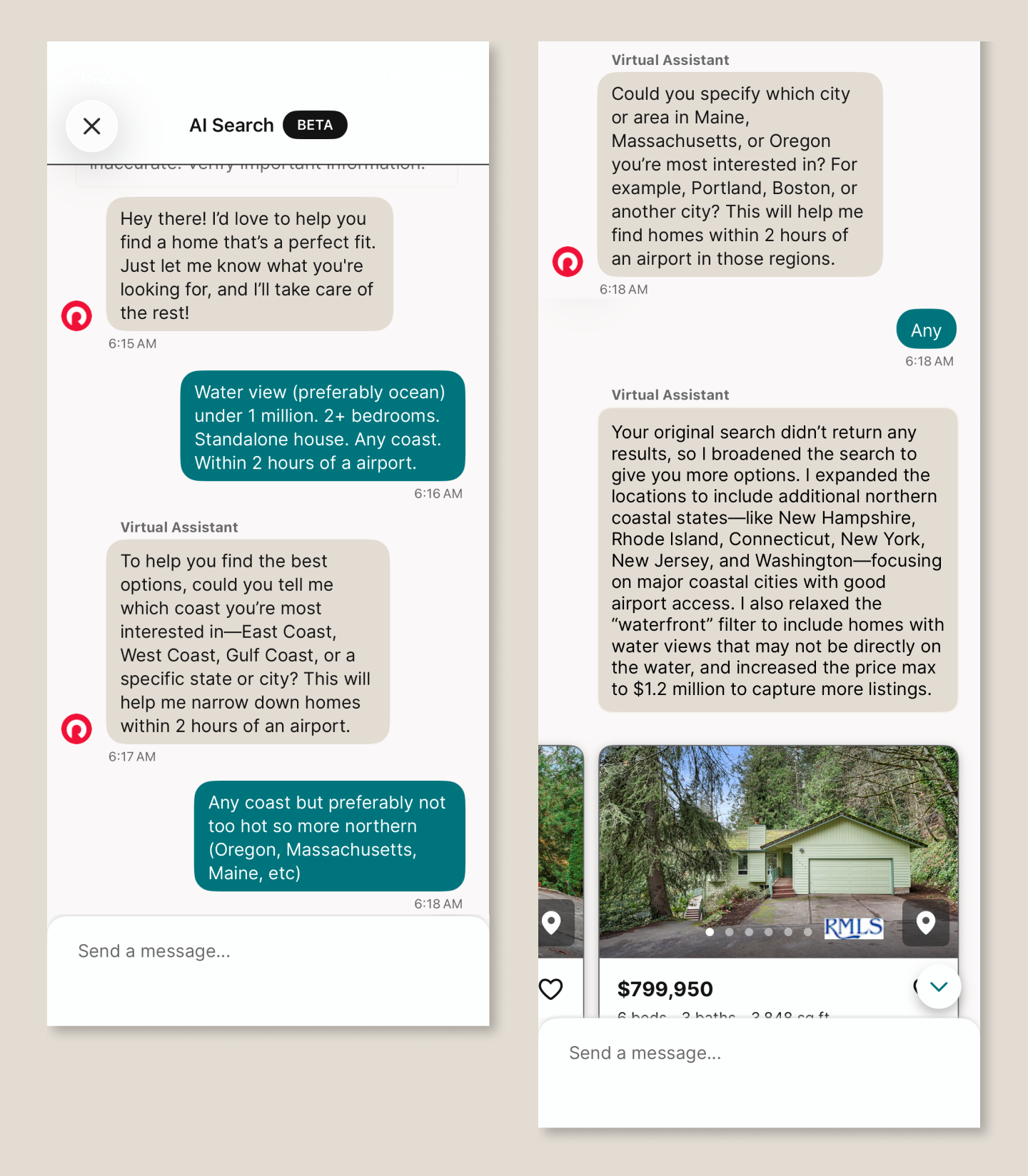
Redfin’s traditional search relies on structured filters—especially location—which works well for many buyers. But it falls short on fuzzier needs: comparing non-contiguous neighborhoods, needing a fenced backyard for a dog, or describing preferences like “light” or “open floor plan.”
AI should help here. Instead, the experience breaks down:
It ignores the prompt: Prompted to search “any coast,” it repeatedly asks which coast.
It invents constraints: It “relaxes the waterfront filter” when no such filter was requested. (I had requested a water view.)
It misinterprets intent: A request for homes within two hours of a major airport returns results in cities with major airports
The result isn’t just unhelpful–it undermines confidence in the product.
2. It’s over-promoted (and becomes annoying)
You want users to discover the feature. You may even want to shift behavior. But overdoing it backfires.
Repeated pop-ups, forced exposure, or turning features on by default will, at best, irritate users—and at worst, disrupt them.
Case in point: Google Meet’s “Ask Gemini”

When the feature launched, it appeared repeatedly across meetings—even after being dismissed. Within days, it had shown up half a dozen times.
The result: annoyance, not adoption. And notably, no clear understanding of what the feature actually did.
If you use interruptions to announce a feature:
Show them sparingly (2–3 times max)
Space them out
Avoid interrupting task-focused moments
This matters even more in tools like Google Meet, where users are trying to stay focused.
Related example: Otter.ai
Otter automatically posts a “meeting ending soon” message in a meeting chat 5 minutes before the meeting ends—even when the meeting organizer didn’t invite the tool. It’s distracting to the organizer and pulls attention at exactly the wrong moment.
3. It’s turned on by default
After investing heavily in a feature, it’s tempting to force adoption. Don’t.
AI should enhance productivity—not compete for attention. Users should choose when and how to engage with it.
Case in point: Adobe Acrobat’s PDF Summary
Auto-invoked summaries often interrupt simple workflows. For many users, it’s faster to skim a document themselves than to engage with an unnecessary AI layer. Most PDF documents I open are short and what I need is easy to find thanks to headers—and the human brain’s amazing ability to scan. And yet, Adobe keeps displaying AI summaries. My reaction: what a waste of resources. When AI appears uninvited, it feels like friction, not help.
The Bottom Line
AI adoption is accelerating. Many users are already comfortable with tools like ChatGPT or Copilot, and their expectations are rising just as quickly.
Set a high bar with these key considerations when designing user interfaces for AI-powered applications:
The feature should do something meaningfully new
The output should be reliable and useful
The experience should feel like an upgrade, not an interruption
Most of all, be user-centric. AI may change the interface, but it doesn't change the fundamentals—understanding users, defining real needs, and innovating solutions.
If your product is evolving with AI and you’re not sure the experience is keeping up, that’s worth a conversation. Functionaire helps teams design AI-powered products that actually work for the people using them. Let‘s talk.